Tech Pack Template Builder
Build the tech pack a factory asks for: bill of materials, graded measurements, construction notes and a cost sheet, with a checklist of what is still missing.
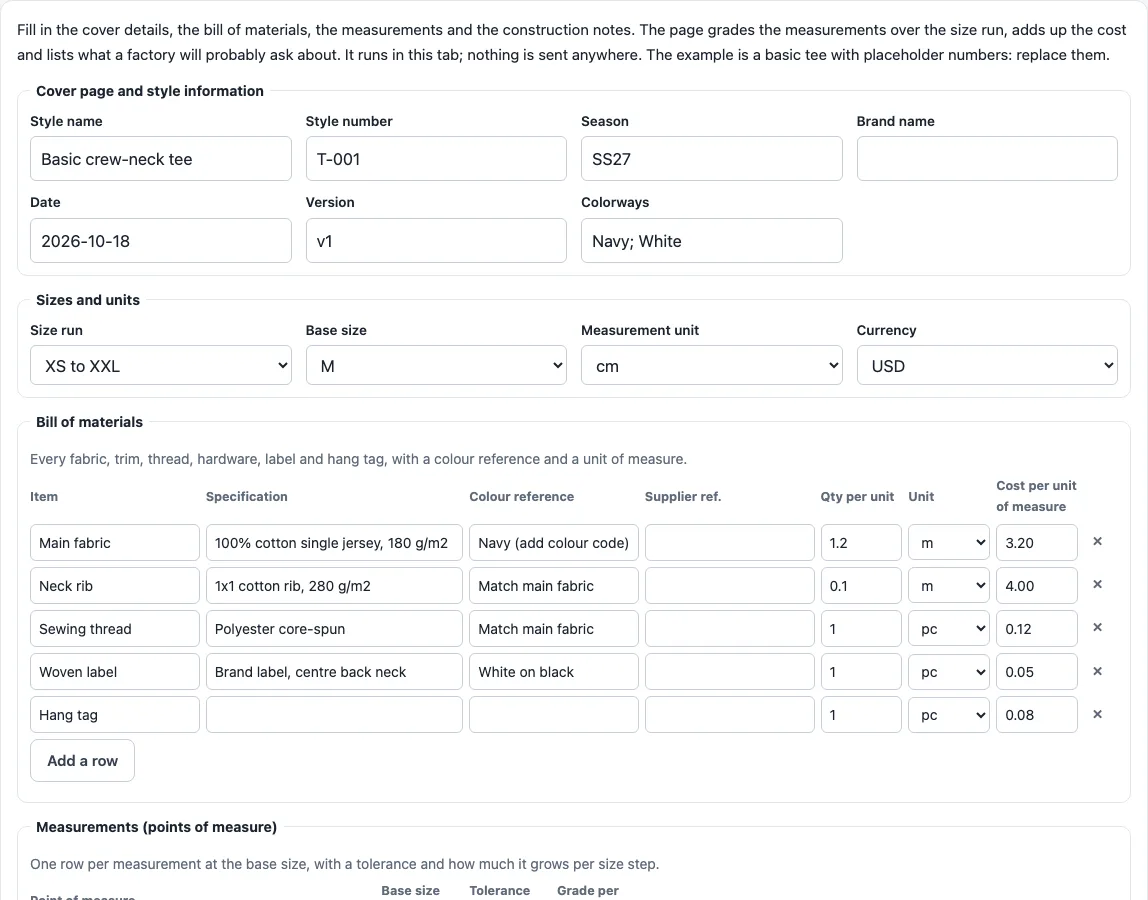
How to use the tech pack builder
- Choose a starting point. Click “Load the example (basic tee)” to see placeholder values, or “Start with a blank sheet” to clear them.
- Fill in the cover fields: Style name, Style number, Season, Brand name, Date, Version and Colorways.
- Set “Sizes and units”. Pick a size run (XS to XXL, 2 to 12, or One size), a base size, a measurement unit (cm or in) and a currency.
- Add rows to the Bill of materials: Item, Specification, Colour reference, Supplier ref., Qty per unit, Unit and Cost per unit of measure.
- Add rows to Measurements: Point of measure, Base size value, Tolerance and Grade per size step. The value for each size is calculated for you.
- Add rows to Construction notes: Area and Instruction.
- Enter the Cut-make-trim (CMT) cost per unit and the Target FOB price per unit. The line costs and totals are calculated from your quantities.
- Add rows to Revision history: Version, Date, Change and Approved by.
- Read the checklist, which marks each part Done, Missing, Check or Attach.
When the sheet is ready, “Print tech pack” opens the print dialog with a clean document, including a box for your flat sketches. You can also use “Copy as text” or “Download BOM and measurements (CSV)”.
What is in a tech pack?
A tech pack gives a factory everything it needs to make one product the same way every time. It is organised into sections: a cover page with style information, technical flat sketches, a bill of materials, measurement specifications and grading, construction notes, a cost sheet and a revision history.
The flat sketches show the front, back and side of the garment or product, with a labelled callout for each measurement point. The measurement section is usually a point-of-measure (POM) chart. It lists every dimension at the base size with a tolerance range, and grading rules that show how each dimension changes across the size run.
The bill of materials lists every fabric, trim, thread, hardware item, label and hang tag. Each entry has a colour reference (a Pantone code where one applies), a supplier reference if there is one, and a unit of measure. Construction notes cover seam types, stitch count per inch, thread colour and finishing. A note that only says “standard construction” leaves the factory to guess, and different factories will guess differently.
The cost sheet shows estimated material costs, cut-make-trim (CMT) labor and a target FOB price. The revision history records what changed, when, and who approved it, so the factory builds the right version.
What is the difference between a tech pack and a spec sheet?
A spec sheet is one section of a tech pack, not a replacement for one. It might list measurements or materials, but it does not cover the sketches, construction, costs and revision record together.
The guide compares it to giving a builder only the floor plan without the materials list or the construction drawings. A full tech pack keeps all the details in one document, and the version number and revision history show which version is current. When you prepare a tech pack, treat any spec sheet as one part of that document rather than the whole package.
Sources read for this page
Opened on the dates shown; notes say where we used a substitute.
- Techpacker: What Is a Tech Pack? The Complete Fashion Guide (page dated 2026-08-05) (read 2026-10-18). Published by a tech pack software vendor: used only for its list of what a tech pack contains; its statistics on revision rounds and costs are not used.
Frequently asked questions
How do I grade measurements across sizes?
Each size value equals the base size value plus the grade per step, multiplied by the number of steps from the base size. For example, a chest of 52 cm at base size M with 2 cm per step gives XS 48, S 50, M 52, L 54, XL 56 and XXL 58. A blank grade means every size uses the same value.
Is the tech pack builder free and is anything uploaded?
Nothing is uploaded. The builder runs in your browser, so the information you enter stays on your device.
Does the builder draw flat sketches?
No. The checklist always marks flat sketches as Attach, so you will need to prepare them separately. The printed document includes a box where you can place them.
Will a factory accept a tech pack made with this builder?
The builder is a checklist and calculator, not a guarantee. It cannot check your measurements, materials or compliance, so a factory may still ask questions or request changes.
What does the checklist flag?
It flags empty cover fields, a bill of materials with no rows or with items missing a specification, colour reference or unit, and measurement points without a number or tolerance. It also flags construction notes that are empty or only say “standard”, a cost sheet missing a target FOB price, CMT cost or line quantities, and a missing revision entry.
How are the costs calculated?
Each line cost is the quantity per unit multiplied by the cost per unit of measure. Materials are the sum of the lines, and the total is materials plus CMT. In the example tee, materials come to 4.49 and the total is 6.09, which is 0.41 below the target FOB of 6.50. These are placeholder numbers, not real prices.
Can I use the tech pack I make for my business?
Yes. What you make here is royalty-free for personal and commercial use, with no credit needed. The only thing you may not do is copy the builder or the site itself to run a competing service; see the terms.
Related tools
- China Factory: How to Find a Manufacturer, Free RFQ Builder: Use this when you need a factory that can make the product described in your tech pack.
- Alibaba Trading Company vs Factory: How to Tell a Supplier Apart: Read this to understand who you are dealing with before you send a specification.
- Sourcing Agent China: What Agents Do and How to Check One: what a sourcing agent does, and what to ask one before you hire.
- How to Import From China: Steps, Duties and a Landed Cost Tool: Use this once your product is made and you need to plan shipping and customs.