Alibaba Verified Supplier: What the Badge Means
Read what each badge covers, then enter what a profile shows to see which signals it raises.
The Supplier legitimacy checker on this page is a free, browser-based tool that helps you judge an Alibaba supplier, including one shown as a verified supplier, by turning what you see into a list of risk signals. It runs in your browser, needs no sign-up, and uploads nothing. No website is queried either.
An Alibaba Verified Supplier badge is a useful starting point, but it is not a guarantee. It shows that a supplier was checked by third parties at some point. It does not show that the products are good or that the business is honest. This page explains what the badge means, how to read its report, and how to use the checker to ask the right questions before you pay.
Use the checker before you contact a supplier, when you compare quotes, or when you read a report and want a clear list of next checks.
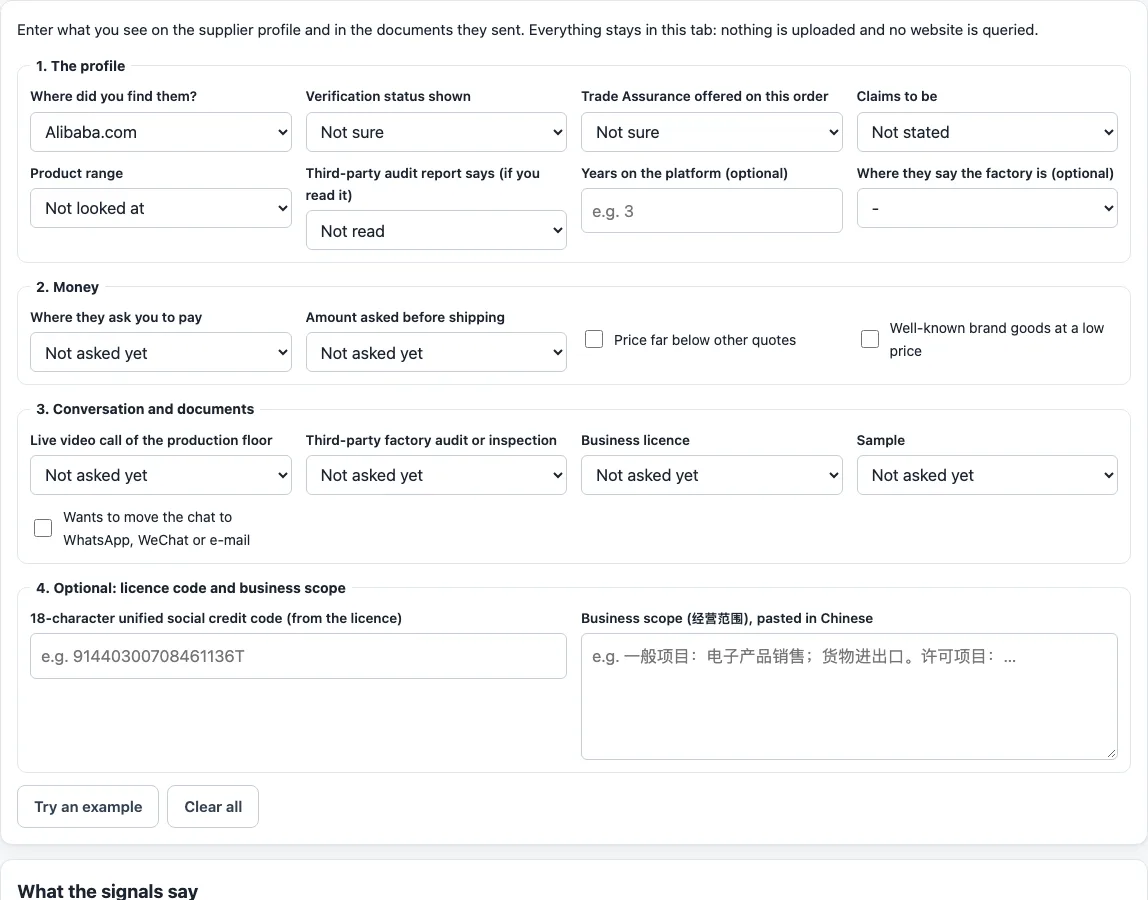
How to use the Supplier legitimacy checker
Have the supplier’s Alibaba page open, along with any quote or report the supplier has sent you.
- Enter where you found the supplier.
- Select the verification status shown on the listing.
- Say whether Trade Assurance is offered.
- Write what the supplier claims to be.
- Choose how wide the product range is.
- Say what a third-party audit report says, if the supplier has one.
- Say where the supplier asks you to pay and how much before shipping.
- Mark whether the supplier refused any of these: a live video of the production floor, a factory audit, the business licence, or a sample.
- Say whether the price is far below other quotes.
- Optional: enter the 18-character unified social credit code. The tool checks its check character, then decodes the registering department, entity type and region code.
- Optional: paste the business scope in Chinese. The tool highlights manufacturing words (生产, 制造, 加工) and trade words (批发, 销售, 进出口) with English meanings.
- Read the results: risk signals marked High, Medium, Reassuring or Note, each with a reason and source links; a “Looks like a manufacturer”, “Looks like a trading company” or “Unclear” card with its evidence; and a list of next checks.
When you finish, press Print checklist to print a one-page check sheet.
What is an Alibaba Verified Supplier?
An Alibaba Verified Supplier is a badge given to a Gold Supplier whose profile, management, production capabilities, products and processes have been assessed or inspected by third parties. The badge sits on top of Gold Supplier, which means a business has been verified as legally registered by a third-party institution.
Alibaba’s seller page says Verified Supplier involves on-site verification by a third-party inspection company. That visit produces an assessment report that is open to all buyers. The page does not name the inspection company, so ask for the report and check who issued it.
Trade Assurance Supplier is a separate badge. It applies to a Gold Supplier that accepts payment through Alibaba.com, which enables payment and order protection. Read each badge on its own terms.
Is a Verified Supplier safe?
A Verified Supplier badge is a filter, not a finish line. Alibaba’s buyer guide says anyone can list products on the platform, so sellers range from real manufacturers to unverified traders and scammers. It also says verification does not guarantee product quality or ethical practices.
Sourcing agents are also cautious about labels. Epic Sourcing, a sourcing agent’s blog, notes that marketplace labels are self-declared and often inaccurate. Treat the badge as a reason to look closer, then read the report and run your own checks before you pay.
The report is where the evidence sits: see the FAQ below for what to compare. The checker’s results are a list of signals from what you enter. They are not an audit, a guarantee, or a verdict on any company.
Where do I find the Verified Supplier report?
Alibaba says the assessment report that results from the on-site verification is open to all buyers. Look for it on the supplier’s profile, and ask the supplier for it by message if you cannot find it. Check the date on the report: it describes the company on the day it was made, not today.
Sources read for this page
Opened on the dates shown; notes say where we used a substitute.
- Alibaba.com: How sourcing on Alibaba.com works (badges, Trade Assurance, samples, payment) (read 2026-10-17)
- Alibaba.com: Verified Supplier (seller page) (read 2026-10-17)
- Alibaba.com buyer guide: Is Alibaba B2B legit? (2026-02-28) (read 2026-10-17)
- Made-in-China.com: Audited Supplier (read 2026-10-17)
- Epic Sourcing: Factory vs trading company (2026-06-02) (read 2026-10-17). A sourcing agent's blog; used for its checklist, not as an authority.
Frequently asked questions
How do I read a Verified Supplier report?
Check that the company name and address match the business licence, that the business type is stated, and that the scope of what was inspected and the report date are shown. Also check whether the inspectors saw the production lines for your product category. If any of these do not match or are missing, treat the badge as unconfirmed.
What is the difference between Gold Supplier and Verified Supplier?
A Verified Supplier is only granted to a Gold Supplier, so it always sits on top of that badge. Trade Assurance is a third, separate badge about payment, so it does not show a higher level of verification.
Does this tool tell me whether a supplier is a factory?
The tool gives a “Looks like a manufacturer”, “Looks like a trading company” or “Unclear” card, with the evidence behind it. A trading company is a normal kind of business, so this card describes the supplier rather than warning you about it.
What do the High, Medium, Reassuring and Note labels mean?
Each risk signal carries one of these labels, a short reason, and links to its sources. High and Medium signals are points to check before you pay. Reassuring and Note signals give context, and none of them is a verdict on the company.
Does the checker look up the supplier online?
No. The checker runs in your browser and works only with the answers you enter, plus the optional code and business scope. It queries no website and uploads nothing.
Related tools
- Is Alibaba legit?: Read this when you want an overview of the platform before you look at a single supplier.
- Supplier verification steps: Use this when you are ready to go beyond badges and check a supplier step by step.
- Factory vs trading company: Use this when you need to decide whether a supplier makes the product or resells it.
- Alibaba scams: Use this to learn the warning signs of fake sellers before you send any money.